Twilio Onboarding
0 to 1 design
Overview
This is a 1.5 year, cross-team project that I lead and own end-to-end from user research to design execution. I've been a strong partner for PM to establish a product vision and strategy and get external team's buy-ins. We built the Twilio product onboarding framework from 0 to 1 that all Twilio pillar products can adopt, and drove a 30% increase in user activation in the first release.
My team - Growth onboarding team
1 product manager
1 product designer (Me)
4 software engineers
Design comparison
Before
After
Business opportunity
Twilio is a developer platform for telecommunications. It bridges the gap between telephony and internet. Growth team’s mission is to activate, retain and grow self-service customers to become sales-qualified-leads (SQL).
Our previous analysis has shown that PA10 (10 API calls from a customer) customers are 5x more likely to become an SQL. Our team uses PA10 as a proxy for successful user onboarding/activation. However, our PA10 rate across all products and nations are only at 13%, which means that 87% of Twilio signups don't even use our products.
Target customers
New Self-service customers who are trying to build their first application with Twilio, and evaluate if Twilio is the communication vendor they should use.
Legacy onboarding experience analysis
To start with, I audited the legacy onboarding experience to understand the problem space.
Sign up
Verify email and phone number
Fill out onboarding questionnaire
Land on Account Dashboard
onboarding focus
Onboarding questionnaire
Legacy Account Dashboard
From the audit, I identified the following potential user pain points on Account Dashboard:
-
No clear guidance on what users should do
-
Multiple CTAs compete for attention
-
Inrevelent or duplicated information that doesn’t help onboarding
Meanwhile, there are 60+ variants of Account Dashboard that are desperate or out-of-date. It has became a burden for the Growth team to maintain and iterate.
User research
To further understand the customer journey and identified the pain points, I conducted 13 interviews with self-service developers across regions with various coding levels.
The research objectives were:
-
Identify customers’ Jobs-To-Be-Done with Proof of Concept (POC) and productionizing with Twilio SMS
-
Identify the key levers for success and major roadblocks in user onboarding
-
Find out what resources on Account Dashboard help with onboarding
Top findings:
Insight 1: Upon creating a Twilio account, users want to quickly build out a Proof-of-Concept to evaluate Twilio. They expect a clear starting point on Account Dashboard.
The current Account Dashboard doesn’t provide the needed guidance. Users often use resources outside of Twilio Console to onboard themselves.
Insight 2: Users expect a contextual and personalized experience, including relevant code samples and applicable information the helps them evaluate if Twilio can meet their needs.
The current “one size fits all” experience doesn’t align with users expectations.
Based on the interviews, I was able to map out the Jobs-to-be-done (JTBD) with building out a Proof of Concept (POC) and productionzing with Twilio SMS, and the helpful resources or roadblocks within each step. This has became the foundation of our onboarding design concept.
Customer problem statement
As a self-service developer who wants to use SMS, when I’m trying Twilio for the first time, I want to quickly evaluate Twilio for my use case and build my first application.
Currently, I filled out the onboarding questionnaire, but are not served with relevant information catered to my use cases and coding level. I fumble around different sources like Google search, blog posts, and Twilio docs that seem relevant to my use case, which may or may not lead to success. I feel frustrated and overwhelmed.
Product Goal
Establish an onboarding framework that aligns with new customers’ Jobs-To-Be-Done, and is applicable and scalable to all Twilio pillar products.
Design challenge
1. Balance Twilio onbording and product-based onboarding
From interviews, I've discovered that there are task-based product onboarding and general education around Twilio. When is the best time to introduce the right information that aligns with customers’ JTBD, and set them up for success without overwhelming them?
2. Establish a framework that other team can leverage
What are some onboarding themes that can be generalized? How might we provide the onboarding framework and guidance that could benefit all the pillar products and uplevel the UX of the entire Twilio platform?
3. Design a scalable and flexible Account Dashboard that's useful throughout the customer journey
With Account Dashboard being the landing page for all Twilio customers, although our team's current focus is on onboarding, I need to be considerate of other user needs throughout their life cycle, and accommodate those in my design.
Design Iayout ideation
Rationale & Considerations:
-
Clear information architecture with the most critical information being front and center
-
Define consistent information vs dynamic information on the page
-
Remove irrelevant information to declutter the page (with perspective teams' consent)
Research synthesis
Based on the user JTBD, I categorized the information into two types: product task-based onboarding, and general Twilio onboarding. I generalized the task-based onboarding into the following 5 steps:
5-step, task-based product onboarding
Get Twilio credentials
"Hello world"
Sample apps that matchs use cases
Follow tutorials
Launch and scale
Twilio generic onboarding
-
Understand how Twilio works
-
Understand how to use Twilio's APIs
-
Understand the concept of Twilio account SID and auth token
-
Understand the concept of a virtual phone number
-
Understand trial account limitations
-
Know where to look for help when needed
-
Know how to invite user
-
Know how to add subaccounts and do proper account management
-
Understand the benefits of upgrade
-
Understand how to troubleshoot their applications
-
Understand how different Twilio products fit together
-
Learn about pricing
-
Learn about messaging deliverability
-
Learn about messaging scalability
...
Onboarding design principle
Offer personalized, contextual information that caters to user’s needs
Offer a clear, seamless bulid path while educating users with relevant information that set them up for success
Usability testing feedback and iteration
I conducted usability testings on the initial design with 6 participants. All participants think the 5-step onboarding framework aligns with their JTBD of getting started with Twilio. The average ease-of-use score is 4.2.
They appreciate the guided experience with clear CTA and easy reach of support within each step.
“In fact, this was part of what I really felt being taken care of here because it wasn't just throwing out in the rough like here's some code if you want to deal with it. it was like, we want to make your experience the best it can be here”
-Director of IVR software development at TeleSage
“I think that you guys have one of the very best processes in general and it's very insightful. It's very thoughtful.”
- Lead Instructor of 4Geeks Academy
Design iteration
What we've heard
-
Unclear navigation. Users were confused around whether they should proceed with clicking “Next step”, or answer “Yes” to our feedback question, or clicking the primary CTA within each step.
-
Unnecessary complexity. Introducing Twilio Functions (A severless solution that powers the sample app) at this point introduce unnecessary cognitive load and might get the users off track.
Improvement
-
Steamline navigation
Take out the feedback system question while keeping the easy reach to common issues FAQ. Iterate on copy to reduce navigation confusion.
-
Reduce complexity
Do not introduce the concept of Twilio Functions here. Instead, present a demo video.
Before
After
What we've heard
While more novice users appreciate the hand-holding approach, power users would like to go striaght to docs. We need much clearer navigation to provide a way for users to skip certain steps and jump straight to where they need to.
Improvement
There’s no existing design components I can leverage. Therefore, I led the contribution of an interactive stepper component for Design System and use the stepper component in my design.
Design walkthrough
The new Account Dashboard has a clean, modern UI with clear information architecture and relevant resources to help a brand new user get started with Twilio. The onboarding guide offers a digestible build path with clear CTA, instant feedback system, and easy reach for support.
Onboarding guide
Offers a clear starting point towards building out a Proof of Concept
Account info
Offers a quick access for getting Twilio account SID and auth token, one of the top reasons user login to Twilio.
Provides education around trial account limitation.
Helpful links
Secondary, helpful resources to understand how Twilio works, how to use Twilio and how to get help.
The onboarding guide
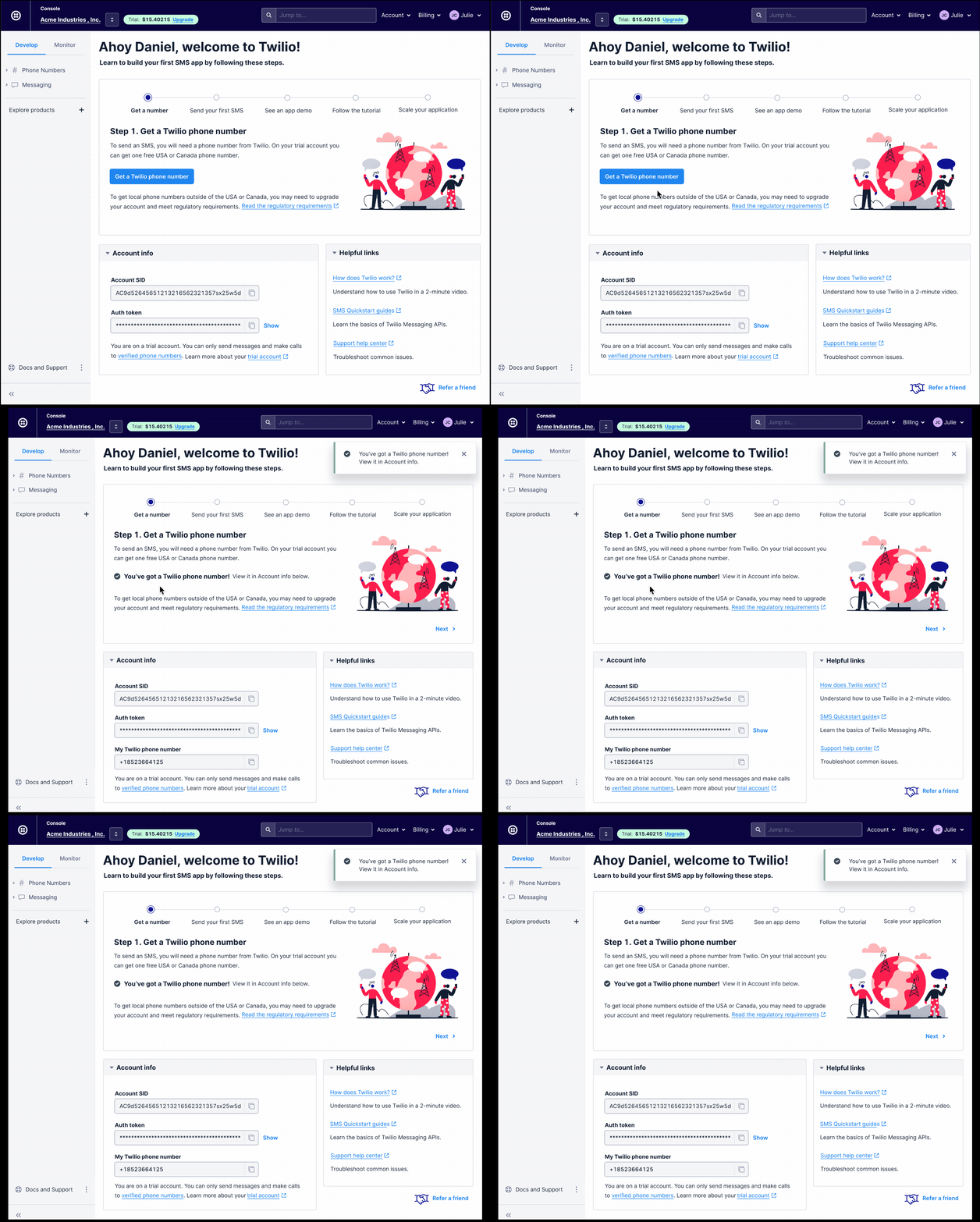
Step 1. Get a Twilio phone number
Get a phone number is the first step to send an SMS with Twilio. To further reduce friction, our team built out the API to auto-provision a US phone number with one-click.
Most countries outside of US required regulatory approval to get a local phone number. The design calls out this information to set the right expectation for international customers, while encouraging them to proceed with a US number for testing.
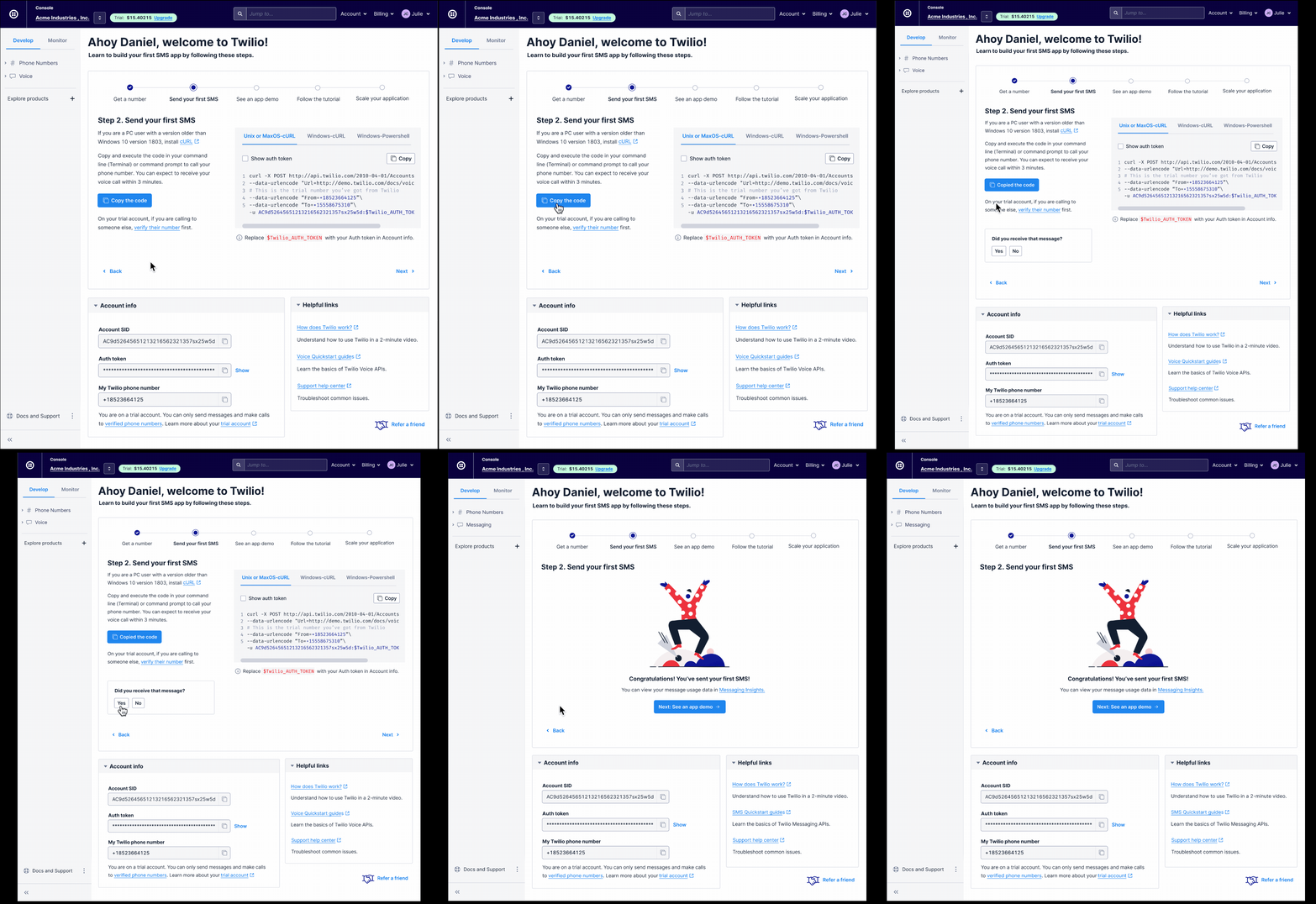
Step 2. Send your first SMS
We embed a code editor with curl to send their first SMS through Terminal, and incorporate a feedback system to ensure user is supported.
To further streamline the experience, we pre-filled the Twilio credentials, "From" number and "To" number.
Happy path
It's a big deal to light up your phone for the first time. We celebrate user's success and introduce Messaging Insights, a powerful analytics tool to monitor their app.
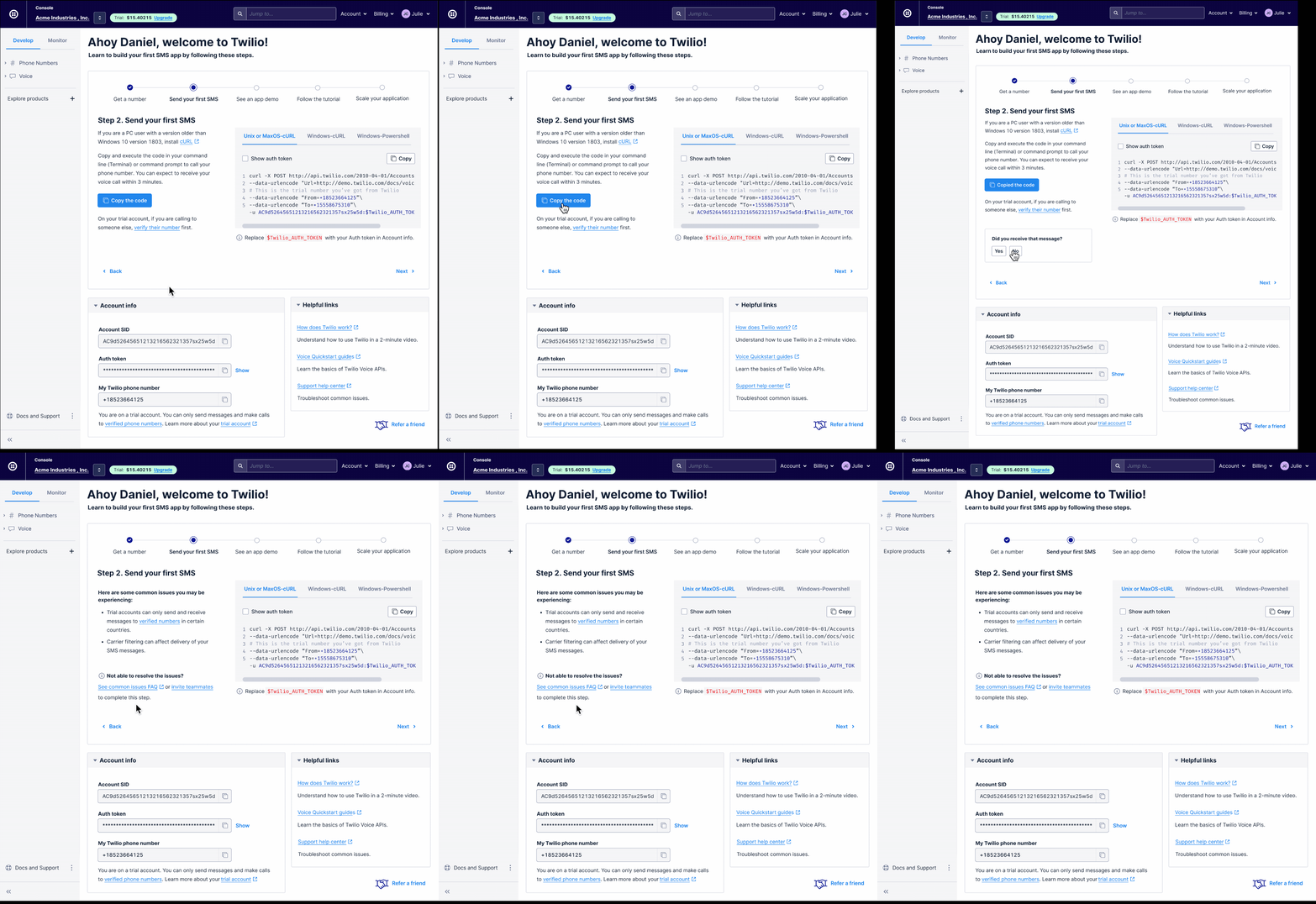
Non-happy path
If user is not able to receive an SMS from Twilio, we surface the most common issues and point them to Twilio SMS Support page to troubleshoot.
Step 3. See an app demo
We point users to a relevant sample app based on the use case they fill out on the onboarding questionnaire.
Users are able to try out the demo app live, and copy and code that's used in the app for their own use.
They also have the option to watch an app demo video.
Step 4. Follow the tutorial
We point users to the Twilio docs site with a tutorial to learn how to send and receive Twilio SMS line-by-line.
Step 5. Launch and scale
We surface relevant guides and document on scaling, account management, pricing and regulation policies.
From customer interviews, these resources have proven to be key in the evaluating Twilio as a communication vendor.
Result and impact
The new onboarding experience has been live for about a month. 85-90% of the customers who have seen this new flow successfully sent their first message with Twilio, compared to 65-70% in our legacy design. We also observed a 14% lift in PA 10 (making 10 API calls) and upgrade metric. This is the biggest improvement in our funnel since the Growth team founded. Other teams outside of SMS, Voice and Verify expressed strong interest in using our onboarding platform.
This was the first project that I designed from 0 to 1. Besides leading the research and design end-to-end, I've been a strong partner with PM to co-define the onboarding product vision and strategy, and become the SME in onboarding. Prior to launch, my PM had to take a family leave for 6 weeks, which required me to up-level my skillset to resolve execution challenges and communicate with multiple external teams to make sure the project releasese on time. This project has earned me an Exceptional (Twilio top 5%) performance rating and a promotion.